 Aura Shield
What you get
Everything here works today.
-
A protected game client
Your game client gets the Aura Shield guard. Traffic to your server is encrypted, and a client without the guard cannot log in.
-
Blocking, never automatic bans
For each kind of finding you choose: record it, or also block it. A blocked player sees the reason and an error code, and plays again once the cause is gone.
-
Watching while the game runs
Common cheat, bot and macro tools, changes to the running game and unusual game speed are reported to your server.
-
PC bans
Every PC gets its own Aura ID. Ban the PC, not only the account, so a new account does not bring a cheater back.
-
Client file check
Only the client builds you approved can log in. Changed game files are refused and noted for your GMs.
-
Tools for your Game Masters
In-game commands to see a player's reports and PCs and to ban or unban a PC, a notice in GM chat for every new report, and report pages for FluxCP with statuses and remarks.
-
Set up for you
We fit the guard to your own server source and game exe. You get back files that are ready to build and to hand to your players.
- Start picture and the Aura Shield name in the game window
- Common overlay, voice and recording programs keep working
- Plain crash message and log file for players
Works with
Fits the server you already run.
- rAthenaRenewal and pre-renewal, built from your own source
- Windows and Linux hostsTested on Windows and Ubuntu 24.04
- Ragexe clients32-bit, 2025-06-04 and 2026-01-07 tested
- Encrypted GRFClients with encrypted game data
- Game proxiesEach player's real address, also behind a proxy
- FluxCPReport pages for your control panel
- DirectX 7 and 9For the ground overlay add-on
- Your own patcherYou hand the client to players your way
Something else? Ask us on Discord before you order.
Add-on
Ground overlay
+10 USD per month
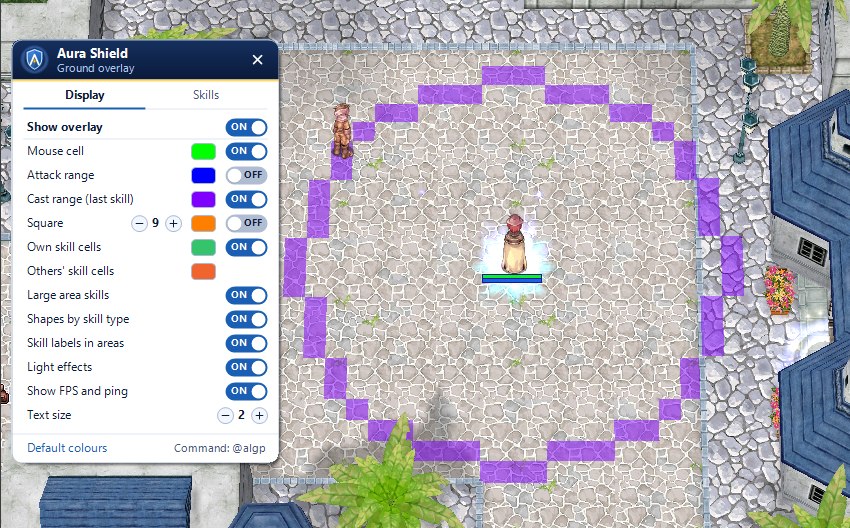
An extra your players switch on themselves: one command opens a small settings window inside the game.
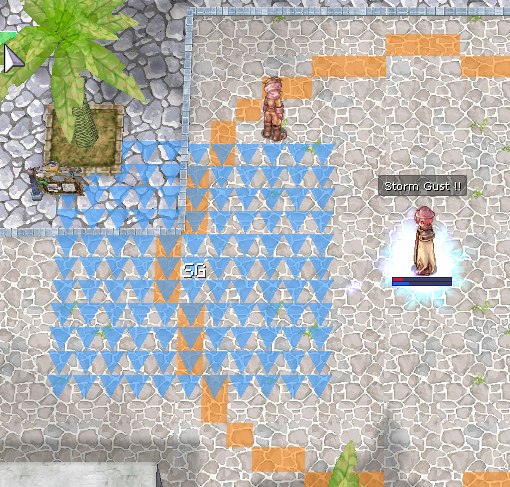
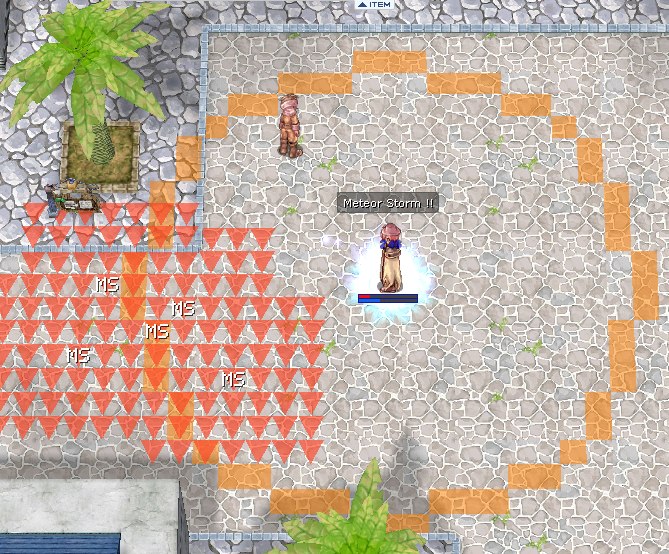
- Area skills drawn on the ground in their own colour, with a short label such as SG or LOV
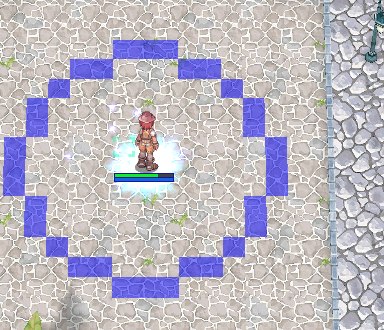
- The cell under the mouse, the attack range and the cast range of the last skill
- FPS and ping in the corner of the game
- Every player picks their own colours and labels
Works with game clients on DirectX 9 and DirectX 7.
Price and ordering
One price. Four steps.
Per game server
15USDper month
- One licence covers one game server
- Active for as long as it is paid, month by month
- How to pay is agreed when you order
- Ground overlay, if you want it: +10 USD
Register and tell us about your server
Make an account in the customer area and fill in your server's IP address and ports, your proxies and the date of your game client. Then message us on Discord.
Send your files
In the same Discord chat, send the source folder (src) of your server and your game exe. We use them only to build your package.
Receive your package
Your source with the guard built in and your game client fitted with the guard. Your licence file and setup guide wait in the customer area.
Install
Build your server, put the licence file in place and give the new client to your players. Protection is on from the next start.
Questions
Before you order
What does my server need?
- An rAthena server you build from source, renewal or pre-renewal. The guard is added to the source, so ready-made programs alone cannot be protected.
- A Windows or Linux host. Tested on Windows and Ubuntu 24.04. Ask us about other Linux systems.
- A way out to the internet from the game server, for the licence check.
- Someone who can build and restart your server.
Which game clients work?
A 32-bit, unpacked Ragexe client. Tested with the 2025-06-04 and 2026-01-07 clients. Ask us about other dates.
After each new game exe, the list of approved clients on your server has to be updated. The install notes show how.
Does Aura Shield ban players by itself?
No. For each kind of finding your server either only records it or also blocks the game. A ban is always the decision of your staff.
What does a blocked player see?
A clear message with the reason and an error code, and a log file in the game folder to send to your Game Masters. They can play again as soon as the cause is removed.
Can a banned player come back with a new account?
Not on the same PC. A PC ban applies to the PC: the same username and password can still be used on another PC. To stop the account itself, ban the account in the usual way.
Will Discord, OBS and similar programs still work?
Yes. Common overlay, voice and recording programs keep working alongside the game. If your players need another program, ask in the customer area and we can approve it.
What happens when I stop paying?
Your server asks our licence server from time to time whether the licence is active. When payment stops, the licence stops, and players cannot log in until it is paid again.
Can I get a refund?
All sales are final. The only exception, at our discretion: the product does not work as described on this page and our support cannot fix it within 7 days of your report.
Can one licence cover two servers?
No. A licence is made for one game server and works only there. A second server needs its own licence.
What data do you collect?
When the guard reports a finding, your server sends us a short record: an anonymous PC ID, the kind of finding, the time, the guard version and the country. Never account names, passwords, characters, chat or payment details. Records are deleted after one month.
By ordering you agree to our rules and terms.
Version
What changed lately
Current version
Build 173Released
- Findings reach your server faster, within a fraction of a second.
- Discord, Steam, OBS and MSI Afterburner overlays keep working alongside the game.
- Server owners can approve extra programs for their players.
- Reports name the exact file that was found, so a false alarm is easy to check.
- Ground overlay: the range rings no longer flicker while walking.
- Stronger protection against cheat tools.
- Protection improvements.
Earlier builds
-
Build 162
- A banned PC, and a game whose files your server does not allow, now receive a clear message with an error code.
- Reports show the player's real internet address.
- If the game crashes, the player receives a plain message and a log file to send to a Game Master.
- Block and crash logs include a support section that only Aura Shield support can read.
- Changed player animation files are reported.
- The ground overlay add-on also works on DirectX 7, and the range ring is in place at login and after a map change.
- More kinds of tampering with the running game are reported.
-
Build 153
- A banned PC is recognised again when it returns under a new ID.
- Report pages show the details recorded when a player was blocked.
-
Build 152
- Your server can now block a finding instead of only recording it, with one setting per kind of finding.
- A blocked player sees a clear message with an error code, and a log file is saved in the game folder.
- New report pages for FluxCP, with statuses and remarks for your Game Masters.
- Common overlay, voice and recording programs continue to work alongside the game. Additional programs can be approved on request.
-
Build 148
- Ground overlay: more accurate placement on every map.
- Ground overlay: clearer wording in the settings window.
-
Build 129
- New add-on: Ground overlay, with its own settings window.
- Add-ons are now part of the licence.
-
Build 111
- Protection improvements.
- Licence system with online check.
-
Build 102
- First release.
For security reasons this list says what changed for you, not how the protection works.
Contact
Questions before you order are welcome.
Add us on Discord and send a message. This is our only contact: do not trust anybody who claims to sell Aura Shield somewhere else.